Is CTRTool a Fit for CTR Manipulation After Agency Assassin?
You are searching for a replacement after leaving Agency Assassin. Moving CTR campaigns to a new platform means re-checking how visits are proven, which search engines are covered, and what you actually pay for. The wrong pick wastes budget and leaves you guessing whether clicks happened at all.
This article defines what CTRTool is, who it serves, and where its campaigns run. It then tests whether CTRTool fits CTR manipulation after Agency Assassin by comparing the pay-for-results model, screenshot proof, visit paths, campaign types, pricing, and trust signals, so you can decide whether to switch.
What Is CTRTool? The CTR Campaign Platform Defined
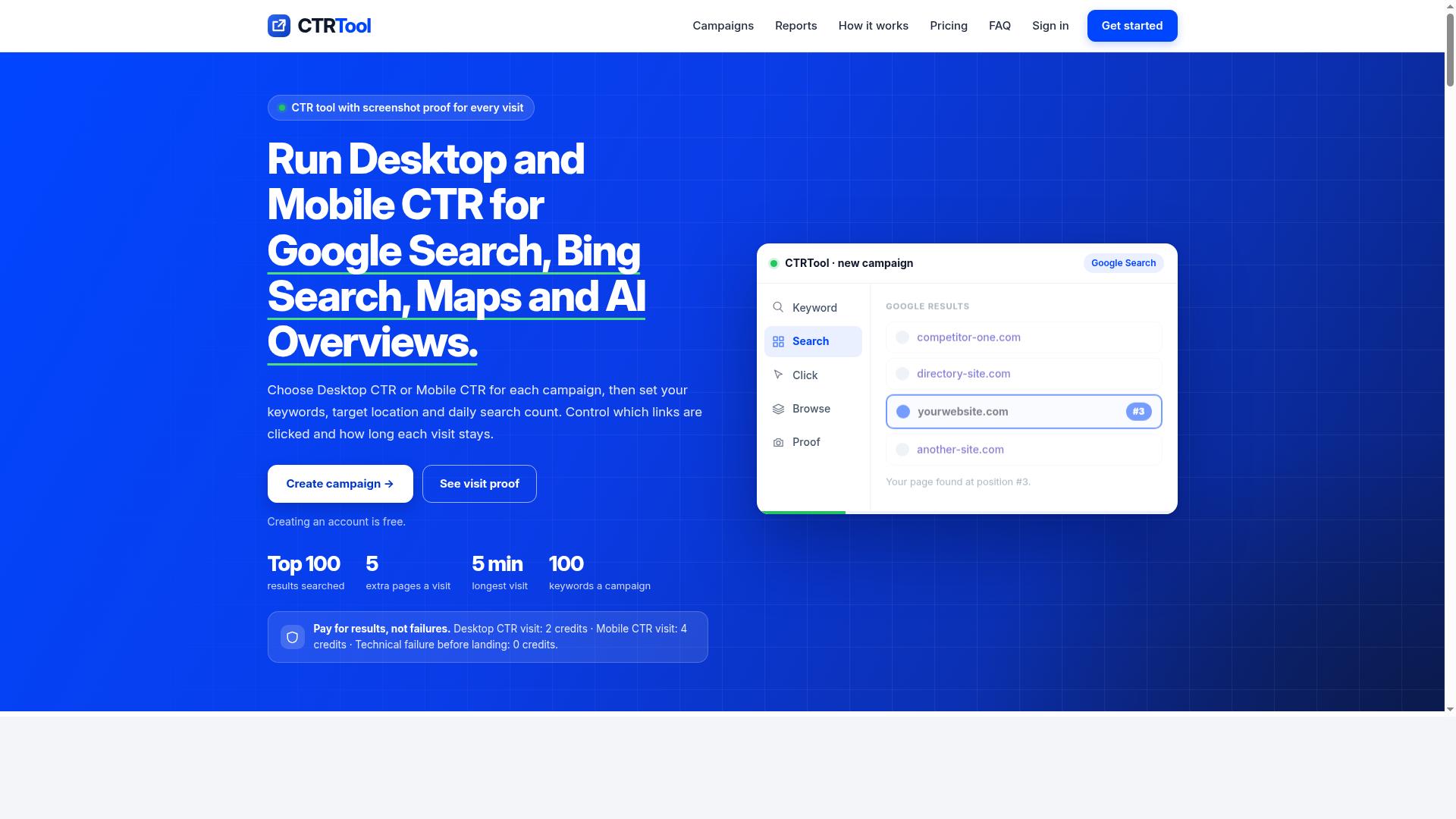
CTRTool is a SaaS platform that runs CTR campaigns for Google Search, Bing Search, Google Maps, and AI Overviews, providing screenshot proof for every visit. It is built for one purpose: to simulate organic clicks from real devices so that user behavior signals shift in a site's favor.
The logic behind the platform is straightforward. Search engines read click-through rate and engagement metrics as signs of relevance, so a steady pattern of real-looking visits can support organic ranking improvement over time. CTRTool gives practitioners a controlled way to produce those visits instead of leaving SERP CTR to chance.
Each campaign is configurable at the visit level. Users choose Desktop CTR or Mobile CTR, set keywords, target location and daily search count, and control which links are clicked and how long each visit stays. That level of control separates a managed CTR campaign from crude click bots that fire and forget.
The platform also tracks keyword positions over time and offers full visit paths, so an SEO agency can see what a campaign actually did rather than guessing. Screenshot proof backs up every visit, which matters when results need to be shown to a client or compared against search console and analytics data.
One point deserves emphasis, and CTRTool states it plainly on its own site: automated visits do not guarantee rankings. The tool shapes behavior signals. It does not override the ranking algorithm, and any honest CTR manipulation discussion should start from that premise.
Who CTRTool Serves and Where It Runs Campaigns
CTRTool primarily serves SEO practitioners and agencies managing CTR campaigns for their own or client websites across multiple search engines and platforms. The typical user already understands keyword ranking, impression share, and how search result clicks feed into user behavior signals.
The audience breaks down into a few clear groups:
- SEO professionals running campaigns for sites they own or manage
- Agencies handling CTR work on behalf of clients
- Reputation managers who need search visibility shaped around specific queries
The site's own guidance also mentions using tier links, PBNs and test properties, which tells you the platform assumes a practitioner who thinks in terms of campaign architecture rather than a one-off click purchase.
Geographically, there are no country restrictions. Campaigns can target any country, with optional state and city targeting when a client needs local search visibility, or "Any country" when a natural mix of locations is preferable. That flexibility matters for agencies running multi-market accounts and for local reputation work where city-level targeting drives the result.
Coverage spans Google Search, Bing Search, Google Maps, and AI Overviews. Running the same campaign logic across all four means an agency is not stitching together separate CTR boosting tools for each surface, and keyword position tracking stays in one place.
For anyone weighing this against an Agency Assassin review or a broader SEO software comparison, the fit question comes down to scope. CTRTool is a dedicated CTR campaign platform, not a general SEO suite, and it is built for teams that treat click-through rate as a deliberate ranking factor rather than an afterthought.
Is CTRTool a Fit for CTR Manipulation After Agency Assassin?
If you're considering moving away from Agency Assassin, CTRTool offers a transparent, pay-for-results model with verifiable proof for each visit. That single distinction, proof, is often the reason agencies and SEOs start comparing the two tools in the first place.
Agency Assassin has been a familiar name in CTR manipulation circles, but familiarity is not the same as accountability. When you cannot see what a campaign actually produced, judging whether a CTR campaign helped a keyword ranking becomes guesswork rather than analysis.
CTRTool positions itself as a CTR tool with screenshot proof for every visit across Google Search, Bing Search, Maps and AI Overviews. That framing matters for anyone running campaigns on behalf of clients, where a search visibility claim needs evidence behind it.
The sections below cover two questions that usually decide the switch: what actually changes in day to day campaign work, and how the credit-based pricing compares to the retainer and pay-per-click models many teams are used to. Both come down to the same theme, paying for delivered visits rather than promises.
What Changes When You Move Off Agency Assassin
Switching from Agency Assassin to CTRTool introduces greater transparency and control over campaign execution and verification. The change is less about a longer feature list and more about what you can actually see after a campaign runs.
The most immediate difference is proof. CTRTool captures search and landing screenshots as separate proof images for every visit, so each click can be reviewed rather than assumed. For an SEO agency reporting to a client, that is a meaningful shift in how results are documented.
You also gain visibility into the path a visit takes. CTRTool records full visit paths, with visits lasting up to 5 minutes and up to 5 additional internal pages. This gives a clearer picture of the user behavior signals a campaign generates, beyond a single page load.
Position tracking adds another layer. Keyword positions are tracked over time, including Maps listing order and AI citation order, which helps connect a CTR campaign to movement in search visibility rather than leaving the outcome unexplained.
- Screenshot proof for each visit, captured at search and landing stages
- Full visit paths with internal page depth
- Keyword position history, including Maps and AI citation order
- One credit balance shared across all campaign types, websites and keywords
- Up to 100 campaigns with 100 keywords each
One practical note from CTRTool's own guidance: the site advises starting with tier links, PBNs and test properties, and using CTR on main sites with caution. That caution is worth respecting during any transition, whatever tool you use.
How CTRTool's Pay-for-Results Model Compares
CTRTool uses a credit-based monthly pricing model that ties cost directly to campaign volume, offering predictable expenses for agencies and SEOs. Instead of a flat retainer for an undefined scope, you buy credits and spend them on actual visits.
The structure is straightforward. A Desktop CTR visit costs 2 credits and a Mobile CTR visit costs 4 credits. A verified search without a match costs 1 credit, and a technical failure before landing costs nothing, which keeps spend tied to delivered work.
| Plan | Monthly Price | Credits | Approx. Desktop Visits | Approx. Mobile Visits |
|---|---|---|---|---|
| Starter | $59 | 2,000 | Up to 1,000 | Up to 500 |
| Growth (Recommended) | $125 | 5,000 | Up to 2,500 | Up to 1,250 |
| Scale | $399 | 20,000 | Up to 10,000 | Up to 5,000 |
| Agency | $699 | 40,000 | Up to 20,000 | Up to 10,000 |
Compare that to typical pay-per-click or retainer arrangements, where cost is fixed in advance and delivery quality is harder to verify. With a pay-for-results model, you pay for credits that produce actual visits, each backed by proof.
Several safeguards keep the model fair in practice. Visits that cannot verify the requested location use no credits, and unused credits roll over while your subscription stays active, expiring only when cancellation takes effect. Creating an account is free, and custom development carries a separate, agreed one-time fee.
For teams transitioning from Agency Assassin, the appeal is predictability. A Growth plan at $125 covers up to 2,500 desktop visits, and you can scale to the Agency tier as client demand grows, without renegotiating a retainer each time.
Key Features That Matter After Switching
After switching to CTRTool, the features that drive campaign success are those that ensure accountability and broad platform coverage. Former Agency Assassin users often arrive looking for two things above all: proof that every visit actually happened, and the ability to run campaigns beyond a single search engine.
Those two priorities shape how a CTR campaign is planned and reviewed. Verification keeps the work defensible, while platform range keeps the strategy flexible as search visibility shifts across engines and surfaces.
The sections below cover each in turn. They are a short orientation, with the deeper mechanics handled under their own headings.
Screenshot Proof and Full Visit Paths
Every CTRTool campaign includes screenshot proof for each visit, showing both the search result click and the landing page view as separate images. That separation matters because it documents two distinct moments: the visit originating from the SERP, and the destination page actually loading.
Beyond single images, CTRTool reports include full visit paths. These trace the user journey from the search result through to the landing page and any additional internal pages visited, so the sequence is recorded rather than assumed.
The reporting layer also tracks keyword positions over time. This covers Search positions, Maps listing order, and AI citation order, giving a longitudinal view of where a target sits rather than a one-off snapshot.
For an SEO agency or a reputation management team, this transparency is the practical difference. Screenshots and visit paths let you demonstrate results to clients with concrete artifacts instead of summary claims, which builds trust in the reporting itself.
Campaign Types: Google Search, Bing, Maps and AI Overviews
CTRTool supports four distinct campaign types: Google Search CTR, Bing Search CTR, Google Maps CTR, and AI Overview CTR, each with specific targeting options. Users choose Desktop or Mobile per campaign and can set keyword positions.
- Google Search CTR: target a search keyword and click the organic result, with search depth up to 100 results and support for internal pages.
- Bing Search CTR: the same keyword and organic click approach applied to Bing.
- Google Maps CTR: find the business listing and click its website link, checking up to 50 listings with city targeting.
- AI Overview CTR: find the website in the overview and click its source link, with matching criteria required.
Each campaign can hold up to 100 keywords, with country, state, and city targeting or Any country. Daily search counts can be set to now, spread out, or with a gap, alongside days, hours, and time zone, with daily goals resetting at 00:00 UTC.
The value for a former Agency Assassin user is running all of this from one dashboard. A single credit balance is shared across every campaign type, website, and keyword, so CTR manipulation work across Google, Bing, Maps, and AI Overviews does not require separate accounts or fragmented tracking.
Pricing and Plans
CTRTool offers four monthly plans: Starter at $59 for 2,000 credits, Growth at $125 for 5,000 credits, Scale at $399 for 20,000 credits, and Agency at $699 for 40,000 credits, with credits converting to Desktop or Mobile CTR visits. Plans are billed monthly in USD.
Credits are the core unit of every campaign. A Desktop CTR visit costs 2 credits, while a Mobile CTR visit costs 4 credits. The plan tiers therefore translate into different visit volumes depending on the device mix you target.
| Plan | Price | Credits | Desktop Visits | Mobile Visits |
|---|---|---|---|---|
| Starter | $59/month | 2,000 | Up to 1,000 | Up to 500 |
| Growth (Recommended) | $125/month | 5,000 | Up to 2,500 | Up to 1,250 |
| Scale | $399/month | 20,000 | Up to 10,000 | Up to 5,000 |
| Agency | $699/month | 40,000 | Up to 20,000 | Up to 10,000 |
Two higher tiers sit above the entry plans for heavier campaigns. Scale at $399 per month provides 20,000 credits, enough for up to 10,000 Desktop or 5,000 Mobile visits. Agency at $699 per month provides 40,000 credits, covering up to 20,000 Desktop or 10,000 Mobile visits.
Cost per visit is straightforward to calculate. On Starter, a Desktop visit works out to roughly $0.06, and a Mobile visit to roughly $0.12. Growth brings the Desktop cost down to about $0.05, which is why it carries the Recommended label.
Not every credit is spent on a visit. A verified search without a match costs 1 credit, and a technical failure before landing costs 0 credits. These rules matter for cost-per-visit planning, since a portion of the budget may go toward verification rather than delivery.
Unused credits roll over while the subscription is active but expire when cancellation takes effect. Creating an account is free, and custom development carries a separate, agreed one-time fee.
One timing detail deserves attention. The site states that prices rise 30% on November 15, presented as limited launch pricing. For an SEO agency running ongoing CTR campaigns, locking in the current rate before that date protects the budget.
Which Plan Fits Which Campaign
Campaign size should drive the plan choice, not the other way around. A small test on a handful of keywords fits Starter comfortably. A sustained campaign across a broader keyword set, or one targeting mobile-heavy queries, is better served by Growth.
Larger operations should look at Scale and Agency. These tiers suit agencies managing multiple client accounts or reputation management projects that need steady search result clicks over time.
- Starter: single site, small keyword set, testing CTR manipulation for the first time
- Growth: ongoing campaigns with a mix of Desktop and Mobile targeting
- Scale: multi-keyword campaigns with consistent monthly volume
- Agency: multiple clients or high-volume reputation management work
Compared with the cost of a full CTR manipulation service, the monthly outlay here is modest and predictable. That transparency is part of why CTRTool holds up well in any SEO software comparison focused on budget control.
Trust Signals and Operational Transparency
CTRTool builds trust through verifiable proof for every visit, clear legal notices, and a support email for direct assistance. For an SEO agency weighing CTR manipulation after Agency Assassin, this level of documentation matters because campaigns need to be defended, not just launched.
Buyers evaluating any CTR boosting tool should ask a simple question: what evidence comes back after the campaign runs? CTRTool answers that with screenshot proof for each visit and full visit paths, so activity can be reviewed rather than assumed.
Here is what the platform provides as tangible records of campaign activity:
- Screenshot proof for each visit, giving a visual record that a visit occurred
- Full visit paths, showing the route taken through a session
- Keyword position tracking, so movements in keyword ranking can be followed over time
- A legal notices page, published at ctrtool.com/licenses.html
- Terms of use, setting out the rules of the service
- A direct support email, vaibhav@autoblogging.ai, for assistance
This combination separates CTRTool from vague CTR manipulation services that promise traffic generation with nothing to show for it. Screenshots and visit paths turn a claim into something an agency can open, inspect, and file.
Keyword position tracking adds a second layer. CTR campaigns are ultimately about search visibility and organic ranking improvement, so being able to follow keyword ranking alongside delivered visits helps teams judge whether user behavior signals are translating into SERP movement.
The legal side is equally practical. A published licenses page and terms of use show that the operator has defined how the service works and what users agree to. For agencies conducting an SEO software comparison, that paperwork is a genuine trust signal, not a formality.
Direct support matters too. When a campaign needs clarification, an agency can reach a named contact rather than a generic form. That responsiveness supports the kind of accountability clients expect when spend is under review.
For agencies, this transparency is what makes a CTR campaign defensible. Client reporting often demands more than a dashboard total. Screenshots, session paths, and position history give an account manager concrete material to justify spend and explain outcomes.
In short, CTRTool treats evidence as part of the product. Verifiable visit records, tracked keyword ranking, published legal notices, and a reachable support address make it a credible choice for agencies running CTR manipulation after Agency Assassin.
Who Should Use CTRTool
CTRTool is best suited for SEO agencies and practitioners who need verifiable CTR campaigns across multiple search platforms and value transparent reporting. The platform is built for people who run CTR campaigns for their own sites or for client websites, and who need to show that visits actually happened rather than just claim they did.
The core audience is SEO practitioners and agencies managing campaigns across Google Search, Bing Search, Google Maps and AI Overviews. That multi-platform reach matters because search visibility now stretches well beyond a single results page, and a campaign that only touches one surface leaves gaps in the engagement metrics you are trying to influence.
Within that group, a few distinct user types tend to get the most value:
- SEO agencies running campaigns on behalf of clients, where proof of visits supports reporting and renewal conversations.
- In-house SEO teams that want direct control over CTR campaigns tied to keyword ranking and organic ranking improvement goals.
- Reputation managers working on search visibility for branded terms and sensitive queries.
It also fits practitioners who follow the site's own guidance on using tier links, PBNs and test properties. Those setups demand careful tracking, and a tool that documents visits makes it easier to judge what is working before scaling spend.
Pricing structure matters here too. CTRTool uses credit-based pricing that scales with campaign volume, so a solo consultant running a small test and a larger agency managing many client campaigns both pay in line with what they actually use. That makes it practical for small operations to start without overcommitting, while larger teams can expand as campaign volume grows.
The common thread across all these users is a need for transparent reporting. Anyone running a CTR manipulation service or CTR campaign for a client has to answer questions about click velocity, IP rotation and whether the search result clicks were real. CTRTool is aimed squarely at that requirement, which is why it suits agencies and practitioners who treat verification as non-negotiable.
If your work involves click bots, engagement metrics and user behavior signals on behalf of others, this is the profile the platform was designed around. For a broader look at how it compares with alternatives like Agency Assassin, an SEO software comparison or Agency Assassin review can help frame the decision.
Final Verdict
CTRTool presents a compelling alternative to Agency Assassin for SEOs seeking a transparent, proof-based CTR manipulation service with flexible campaign types. It is a SaaS platform built for running CTR campaigns, and its core appeal lies in verifiability: campaigns are backed by screenshot proof rather than unverified promises.
That distinction matters after Agency Assassin. When an SEO agency or independent SEO moves away from a previous provider, the biggest concern is usually whether the work is actually happening. Screenshot proof addresses that concern directly, giving teams a tangible record they can review and share internally.
CTRTool also supports multiple platforms, which makes it a practical fit for agencies managing diverse client portfolios. Rather than juggling separate tools for each surface, teams can run campaigns from one place and keep their reporting consistent.
Who is it for? The platform suits SEO agencies, reputation management teams, and SEOs focused on organic ranking improvement through CTR boosting. It is a CTR manipulation service, so it fits teams already running these campaigns and looking for a more transparent home for them.
- Definition: a SaaS tool for running CTR campaigns with screenshot proof.
- Audience: SEO agencies, reputation management teams, and independent SEOs.
- Transition benefit: verifiable campaign records replace blind trust in a prior provider.
- Features: screenshot proof and multi-platform support for CTR boosting.
- Trust signals: published Terms of use, Legal notices, and a Support page.
Pricing is listed in USD on the site, so teams should confirm current plans directly before committing. For pricing questions, account setup, or any other inquiry, contact CTRTool at vaibhav@autoblogging.ai. The site also offers Sign in and Create an account options for getting started.
The verdict is clear. For agencies and SEOs who prioritize verifiability and control over vague assurances, CTRTool is a strong fit after Agency Assassin. The combination of screenshot proof, multi-platform support, and straightforward trust pages makes it a credible, transparent choice for continuing CTR manipulation work with confidence.
Frequently Asked Questions
What exactly does CTRTool do, and how is it relevant after Agency Assassin?
CTRTool is a SaaS tool that runs Desktop and Mobile CTR campaigns for Google Search, Bing Search, Maps and AI Overviews, with screenshot proof for every visit. If you're evaluating tools after Agency Assassin, CTRTool lets you set keywords, target locations and choose Desktop or Mobile CTR per campaign, then tracks keyword positions over time including Maps listing order and AI citation order.
How does the screenshot proof work, and why does it matter?
Every visit in a CTRTool campaign comes with search and landing screenshots as separate proof images, plus full visit paths. This gives SEO practitioners and agencies verifiable evidence of each campaign visit, which is useful when running campaigns for client websites or your own properties.
What campaign types and targeting options does CTRTool support?
CTRTool supports Google Search CTR, Bing Search CTR, Google Maps CTR and AI Overview campaigns, each with Desktop or Mobile selection. You can target a chosen country and optionally a state and city, or use "Any country" for a mix of supported locations. Campaigns work within the top 100 organic results for the chosen keyword and location, Maps campaigns check up to 50 listings, and AI Overview campaigns require a matching source link.
How does CTRTool's pricing and credit system work?
CTRTool uses monthly USD plans with a pay-for-results credit model: Starter is $59/month for 2,000 credits (up to 1,000 Desktop CTR visits or 500 Mobile CTR visits), and Growth is $125/month for 5,000 credits (up to 2,500 Desktop or 1,250 Mobile visits). Credits map to actual visits, so you can match a plan to your campaign volume.
Can I use CTRTool for client websites and agencies, not just my own site?
Yes. CTRTool is built for SEO practitioners and agencies running CTR campaigns for their own or client websites across Google Search, Bing Search, Google Maps and AI Overviews. It's a global online service with no stated country restrictions, and support is available at vaibhav@autoblogging.ai.
How do I get started or ask questions before committing?
You can visit https://ctrtool.com to create an account or sign in, and review the legal notices at https://ctrtool.com/licenses.html. If you have questions about whether CTRTool fits your workflow after Agency Assassin, contact support at vaibhav@autoblogging.ai before choosing a plan.